CLI reference
After this page, you will know what each bolt command does and which options to use for common workflows. You will also learn the selector syntax for targeted runs.
All commands here match bolt-pipeliner==0.2.6.
Command summary
bolt exposes four top level subcommands:
bolt init: scaffold a new projectbolt run: execute ETL jobsbolt test: run data quality checks declared in configbolt generate: generate Airflow, docs, layer scripts, and notebooks
bolt init
Use this command to create a new project interactively or from a preset.
bolt init PROJECT_NAME [--path PATH] [--preset PRESET] [--vendor|--no-vendor]Options:
PROJECT_NAME(required): project name and default target directory name--path PATH: override target directory, default is./<project_name>--preset TEXT:minimal,medallion,diamond,pandas, orpolars--vendoror--no-vendor: include or skip a vendored framework copy
Example:
bolt init my_pipeline --preset pandasbolt run
Use this command to run all jobs, a full layer, or a selector based subset.
bolt run [OPTIONS]Options:
--config, -c PATH: config file path, defaultconfigs/etl_config.yaml- Layer flags:
--flatfile,--bronze,--silver,--gold,--diamond --select, -s TEXT: dbt style selector--layer, -l TEXT: layer filter or selector disambiguation--verbose, -v: print each resolved job before execution
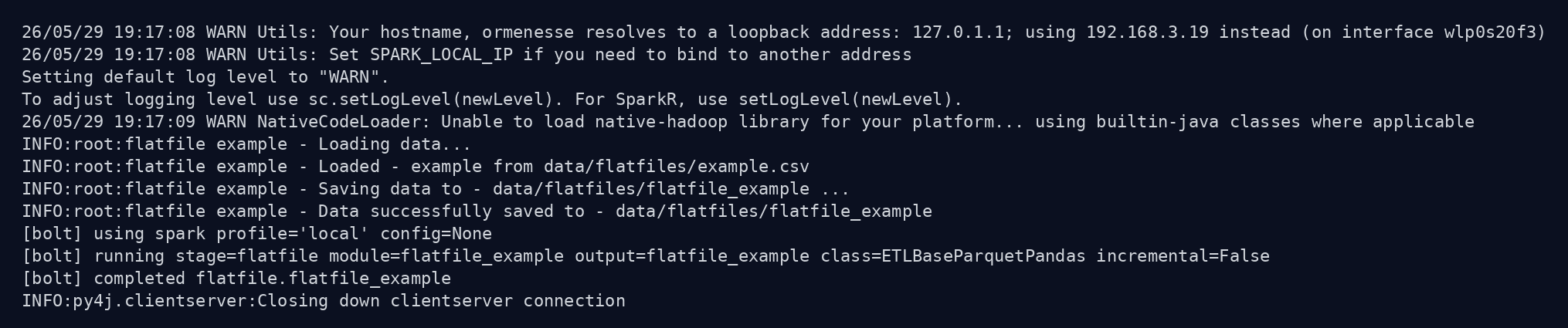
Real bolt run --verbose output from the sample project:
Selector syntax
--select supports four forms:
name: only the selected job+name: upstream dependencies and the selected jobname+: selected job and downstream dependents+name+: upstream, selected job, and downstream dependents
name can be either:
- a full job id:
<layer>_<output_table_name> - a bare table name:
<output_table_name>, if unambiguous
If the same output table name exists in more than one layer, pass --layer to disambiguate.
Selector examples
# Run a single job by full id.
bolt run --select silver_orders

# Run upstream jobs plus the target job.
bolt run --select +silver_orders

# Run the target job and anything that depends on it.
bolt run --select silver_orders+

# Run full dependency neighborhood around one job.
bolt run --select +silver_orders+

# Disambiguate bare table name "orders" to silver_orders.
bolt run --select orders --layer silver
Important rule
Do not combine --select with layer flags like --silver. Use --layer with --select when you need to constrain resolution.
bolt test
Use this command to execute checks declared under each job tests: block.
bolt test [OPTIONS]Options:
--config, -c PATH: config file path, defaultconfigs/etl_config.yaml--layer, -l TEXT: run tests only for one layer--module, -m TEXT: run tests only for one module
Example:
bolt test --layer silver --module customer_featuresExit code is 0 when all checks pass and 1 when any check fails. This makes it safe for CI pipelines.
bolt generate
Use this command to generate downstream artifacts from your config.
bolt generate TARGETS... [--config PATH]Targets:
airflowdocumentationlayersnotebookall
Example:
bolt generate documentation layersTypical command patterns
# First full run while building a project.
bolt run --verbose

# Rebuild only one dependency branch.
bolt run --select +gold_customer_ltv

# Run tests before merging changes.
bolt test

# Refresh generated docs and notebook assets.
bolt generate documentation notebook